Introduction to Coding and Data Analysis for Scientists
Week 3: Loops
Today’s Lecture
- Lecture 3: Loops
- Recap: Accessing Noteable
- Recap: If Statements
- For Loops
- While Loops
- Practical
Recap: Accessing Noteable
- Open Blackboard
- Go to
Introduction to Coding and Data Analysis for Scientists 2025 - Click
Unit Information and Resources - Open Noteable
- Make sure
Jupyter Classic (Legacy)is selected. - Click Start
- Make sure
- Click
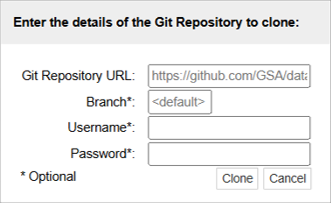
+GitRepo - Paste into Git Repository URL:
git@github.com:TomMaullin/SCIF10002-2025.git - Press clone
Important: Assessed Coursework 1
- The first assignment will be released this week!
- Released
Wednesday 8th Octoberat12:00PM - Due
Wednesday 22nd Octoberat12:00PM
- Released
- This is assessed (
15%of your grade!) - Submission is via
Noteable - You can submit as many times as you like up until the submission date
Noteable Submission
- Download using the Assignments tab on
noteable - Press
Fetchand click on the assignment - Fill your answers in and
Validate - Once done, save your answers and
Submit - Feedback will be available when you see the
(view feedback)option
Recap: If Statements
- Last week, we looked at the
ifstatement ifstatements allow us run code only when a specific condition isTrue- We can add
elifandelsestatements to give us finer control over when code is executed- An
elifruns if it’s Boolean is True and all previous clauses (ifs andelifs) did not execute - An
elseruns if all other clauses did not execute
- An
- Today, we will look at another feature of Python that gives us finer control over our code - loops
Motivation
- Suppose we want to do a very repetitive computation
- For instance, suppose we want to
printthe square of each item in this list
- We could just write something like this…
Motivation
- But it would be nice to be able to do this automatically!
- This is what loops do!
Iterable Objects
- An iterable object is an object which contains lots of elements that we could list one by one
- We’ve already seen an example - the
list - Other examples include:
- Tuples - like lists but use round brackets and can’t be changed
- Dictionaries - records “keys” and “values” so that we can look up data using labels of our choosing
- A
rangeobject - a python object that represents a sequence of numbers, saved in a useful, memory-efficient way
- A
forloop performs an operation on each element in an iterable object
For Loops
- A
forloop lets you run code for every element in an iterable object - Let’s look at an example:
Translation:
“For every number in the list, print that number”
While Loops
- A
whileloop lets you run code repeatedly so long as a Boolean statement isTrue
Let’s compare this to an if statement - An if statement executes once if the Boolean is True - An while loop executes repeatedly until the Boolean is False
Practical
- We now move over to Python
- Please open week_03_home.ipynb
- For the rest of today, you must work through a Python notebook
- You have a choice of one of three options