Functions : Solutions
This notebook contains the solutions to the week 4 Beginner, Intermediate and Advanced exercises.
Table of Contents
Beginner: Defining Functions
Question 1: Running the code gives the following output.
3 4
4 3
2 4
2 1
3 1
In the first line, the inputs are assigned according to the order they were read in, so that x=3 and y=4. In the second line, they are assigned according to the keyword/variable names given, so that x=4 and y=3. In the third line, x takes the default value of 2 whilst y=4. In the fourth line, both default values x=2 and y=1 are used. And in the final line, y takes the default value of 1 while x=3.
Demonstrator Notes: The aim of this question is to get students thinking about how inputs are entered into functions. Please try to prevent students from running the code before they have attempted to answer the question, as the goal is for them to reason it out first.
Question 2: An answer to this question is provided below.
Demonstrator Notes: A useful sanity check for this question is to ask students whether their function works correctly on strings that include punctuation. An easy, and subtle, mistake to make here is to write
if ch == ch.upper():instead ofif ch != ch.lower():. The difference matters because for non-alphabetic characters (like punctuation),ch.upper()andch.lower()are both equal tochitself.
Question 3: The functions for this question are given below.
Demonstrator Notes: Please be mindful that many students may not have studied Physics for several years, so might be uncomfortable with the terms kinetic energy and potential energy. Make sure the student is comfortable with the context of the question before moving into the coding explanation.
Question 4: A sample answer for this question is given below:
Demonstrator Notes: For many students, this may be their first exposure to the
importandfromkeywords, as well as theospackage. They also won’t have encountered plotting yet. If students ask about these topics, you’re welcome to give a brief explanation if you like, but it’s also fine to tell them that these will be covered in detail later in the course if it is easier.
Question 5: The time() function gives the number of seconds passed since epoch (the point where time begins, e.g. January 1, 1970, 00:00:00 UTC is epoch on unix systems). Some suggested code to show students for this question is given below.
Demonstrator Notes: See notes on Question 4.
Question 6: An example answer for this question is given below.
Demonstrator Notes: It is expected that many students will have forgotten the
splitfunction from week 1. Please encourage them to look up documentation where possible, rather than giving the answer directly.
Question 7: If you write a function which redefines a global variable, then inside the function, Python makes a new local variable x when you assign x = 20. That local version is separate from the global version x = 10. So inside you see 20, and outside you still see 10.
Demonstrator Advice: One way of explaining what is going on here is to show students the following code, where we have replaced the calls to
xoutside the function withx_outerand the code inside the function withx_inner.
In this code it is pretty easy to predict what will be printed. Because the variables have different names, there is no ambiguity. Behind the scenes, this renaming is exactly what Python is doing when you redefine a global variable inside a function.
However, it must be stressed that this will only happen when you redefine the variable (e.g. write
x=...) somewhere inside the function. For instance, if we comment out thex=20line from the original code, then the function will treatxas though it isx_outer, notx_inner!
Question 8: Here is an example answer for this question.
Demonstrator Notes: This question is hard, and will be fairly challenging for most students. Please feel free to give them a bit more guidance when answering this one - one good place to start might be to have them compute the \(n^{th}\) Fibonnaci number from the \((n-1)^{th}\) and \((n-2)^{th}\) Fibonacci numbers.
It probably isn’t a good idea to discuss code efficiency/making the code faster at this stage of the course. This question will already pose a large conceptual challenge for many students, and showing them how to rewrite the code to improve it further might feel like an extra layer of complexity. (The above code certainly isn’t the most efficient!).
Question 9: Example code for this question is given below:
Demonstrator Notes: This question is difficult and will need more guidance for many students. It is expected that many students will not think to use the
strconstructor to convert their numerical data into a string and many will not think to loop through the characters of string, treating it as an iterator (e.g. many may not think to write code of the formfor character in my_string:). Beyond these syntax hints, try to encourage students who are struggling to first write how they would perform the computation by hand on paper, before they start coding. This is often a good starting point for explaining the logic and working out what they understand of the question.
Question 10: Code for this question can be found below
Demonstrator Notes: This question should be a little easier than the previous, but please do check that students are actually using the function from the previous question, rather than rewriting the code from scratch, or copy-pasting large chunks.
Intermediate: Flexible Inputs and Outputs
Question 1: The output of the function calls are as follows:
a: 1
b: 2
args: ()
kwargs: {}
---------------
a: 1
b: 2
args: (3, 4)
kwargs: {}
---------------
a: 1
b: 2
args: ()
kwargs: {'x': 10, 'y': 20}
---------------
a: 1
b: 2
args: (3, 4)
kwargs: {'x': 10, 'y': 20}
Demonstrator Notes: This question aims to build on the intuition students have built through the
Arbitrary Positional and Keyword Argumentssection of the notebook. Please encourage students to attempt the question before running the code to check their answer. If students are struggling with the conceptual aspects of this question, please do try to refer back to the notebook section where possible.When discussing the answers to this question, it is worth highlighting that, when we pass no arguments to
*argsand**kwargs, this is the same as passing in an empty list,(), or empty dictionary,{}, rather than passing no variables at all. This is a good discussion point - asking students why they think this is can help you to check their understanding of*argsand**kwargs.
Question 2: An example answer for this question is given below:
Demonstrator Notes: This question is fairly straightforward. We are not expecting answers that are any more complex/streamlined than the above (although students are certainly welcome to try). Given the week 2 intermediate notebook, some students may use a
matchstatement instead of anif-elif-else. This is perfectly fine as well.
Question 3: The expected output for this question is:
Here is another print statement.
----------------------------
----------------------------
Here is a print statement.
----------------------------
Here is a print statement.
----------------------------
Demonstrator Notes: This question is mainly to test the students logic and understanding of how Python handles functions with multiple
returnstatements. A good case to focus on is the casea==0. Useful questions to ask students here include:
- Why do you think nothing is printed whena==0? - Willprint('Here is another print statement.')be printed whena==0? - Will0or-1be returned whena==0?
Question 4: The code returns True if the integer is prime and False otherwise. The answers to the listed questions are as follows:
- What values of
iwill the loop check?
It will check all values between 2 and my_integer-1, inclusive. Given no prior knowledge, these are the values which could possibly be factors of my_integer.
- What does the expression
my_integer % imean?
This is the modulo operator, which we met in the Week 1 Beginner notebook. It gives the remainder obtained from dividing my_integer by i. If this expression equals zero, then my_integer is divisible by i (i.e. i is a factor of my_integer).
- Under what condition does the function return
False?
The function returns False whenever we find an integer i (lying between 2 and my_integer-1) that is a factor of my_integer. In other words, it returns False when my_integer has a factor, that is when my_integer is not prime.
Demonstrator Notes: The aim of this question is to get students thinking about how
returnstatements can be used to end loops prematurely, a bit like abreakstatement. They will have met thebreakstatement in the Week 3 intermediate notebook, but might not realise the connection here. When explaining the logic of this question, feel free to referencebreakstatements to highlight the similarity, but make sure to point out thatreturnnot only stops the loop but also exits the entire function immediately.This question is also a good opportunity to get students to think about debugging code. It is expected that, when asked to work out what the code is doing, many students will try to dissect the code conceptually from first principles without running it. If you see students attempting to do this and struggling, encourage them to adopt a more pratical approach - e.g. suggest that they run the function for several different values of
my_integerand see if they can guess the function’s behaviour from the output.
Question 5: The another_mystery_function function takes in a string and reverses the order of the letters. The same thing can be done using, for example, the below loop:
Demonstrator Notes: Recursive functions can be difficult to explain on the spot. If a student asks for help, then by all means, feel free to go through step-by-step explaining what the code is doing if you feel you are able. However, if you do not feel confident doing this, you can instead encourage the student to identify the code’s function by looking at various inputs and outputs and “spotting the pattern”. The latter is still a good exercise in debugging code and a worthwhile use of the student’s time.
Advanced: Lambda Functions and Functional Programming
Question 1: An answer to this question is given below:
Demonstrator Notes: It might be useful to break this question down into the following steps: 1. Write a (normal) function which checks if a string has between three and eight characters. If it does, the function should return
True, otherwise it should returnFalse. 1. Try to condense this function to only take up a few lines. 1. Convert this function to alambdafunction. 1. Insert thislambdafunction into afilterexpression.Note it is easy to forget that the end result must be converted back to a
list- it is very likely that at least some students will forget to do this and be confused by the object returned by thefilterfunction.
Question 2: Example code for this question is given below:
Demonstrator Notes: As with Question 1, it might be useful to break this question down into the following steps: 1. Write a (normal) function which returns the value of
"name"from a dictionary. 1. Convert this function to alambdafunction. 1. Insert thislambdafunction into amapexpression.Again, it is easy to forget that the end result must be converted back to a
list- it is very likely that at least some students will forget to do this and be confused by the object returned by themapfunction.
Question 3: An example answer is provided below.
Demonstrator Notes: The aim of this question is to give students practice writing higher-order functions and treating functions themselves as objects. Student’s will likely need reminding that they can write
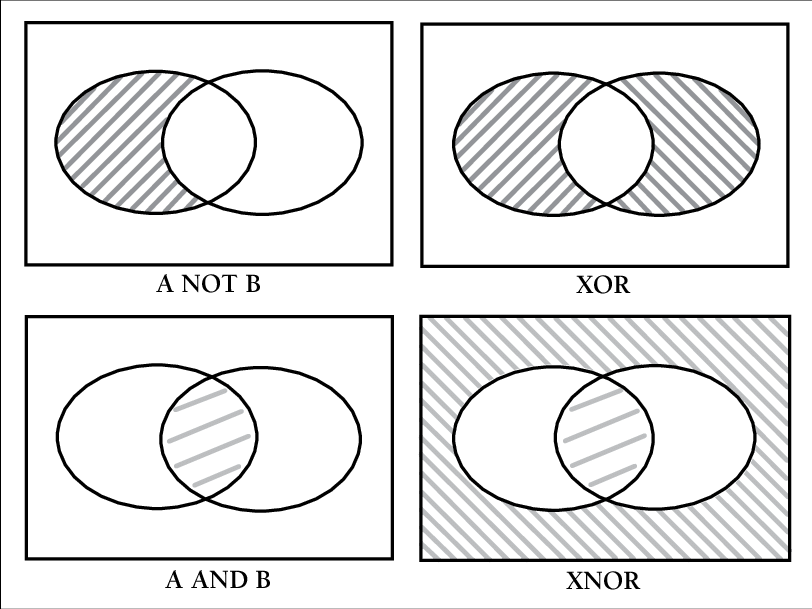
^for exclusive or, as they have only briefly seen this operation in the week 1 beginner notebook. It is perfectly fine, and also a good exercise, to have them instead write outf(x) ^ g(x)as(f(x) and not g(x)) or (g(x) and not f(x))(it may also help to draw a Venn diagram for students who want to adopt this approach).
Question 4: The reduce expression here is performing function composition and the new function is being evaluated with 5 as input. In other words, if the expression is given a list of function \([f_1,...,f_n]\) then the output will be \((f_1 \circ f_2 \circ ... \circ f_n)(5)=f_1(f_2(...f_n(5)...))\).
Demonstrator Notes: For less mathematical students, avoid the phrase “composition”. Instead, explain the idea in plain English. For example: “First, take the last function in the list and run it with the input
5. Then take the result you get and plug it into the second-to-last function. Keep going like this, working backwards through the list.”
Question 5: This function computes the maximum value in a list. Behind the scenes, it is doing the following:
- It first takes the first two elements,
3and1, and applies thelambdafunction which returns the maximum of the two. - Next, it takes the result of the first step, in this case
3, and the next element in the list4. Again it applies thelambdafunction which returns the maximum of the two. - It then repeats this process, each time comparing the current result with the next element of the list, and choosing the maximum of the two, until there are no elements left.
- The final value produced is the largest value in the list.
Another way of thinking about it is as doing the following:
Demonstrator Notes: Although it might not seem like it on first viewing, this example is designed to be extremely similar to the example given in the
reducesection of the notebook. If students are struggling with this, please direct them to this section first.